
FAQ + Pro Tips! (Sports)
How do I add more camera angles?
How do I make it look like a real broadcast?
What's the simplest way to stream to the right place?
Where are my Local Recordings?
How do I remove the Switcher watermark from my stream?
How do I add more camera angles?
Download the Switcher app on any other device you'd like to use as a Remote Camera and use the QR code below or this link to be taken directly to the download page. (iOS + Android)

New for 2026: You can use your Android devices (Samsung, Google Pixel, Motorola) as Remote Cameras.

How do I make it look like a real broadcast?
Use a repeatable graphics package: Start with your logo, a few lower thirds, and a scoreboard. Consistency wins.
What's the simplest way to stream to the right place?
Pick the platforms your audience already uses, connect them once, then go live from Switcher. You can also embed the stream on your team or school's website.
Stream to Facebook - Quick Guide
Stream to YouTube - Quick Guide
How do we get cleaner audio?
Clean audio matters more than another camera angle. If you can pull audio from a mixer or audio interface, route it into your main device via USB.
One of the main benefits of Apple devices is that they are typically plug and play with USB audio sources!
We encourage you to ask our team about optimizing your audio setup! We enjoy this stuff.
Where are my Local Recordings?
By default, a recording will be available on the main broadcasting device, within the Switcher app. You can access the Local Recordings from the initial Welcome screen.
From the Welcome screen, tap Video Library.
After tapping Video Library, tap the text "Video Library" at the top of the page to reveal the dropdown selection for Local Recordings.
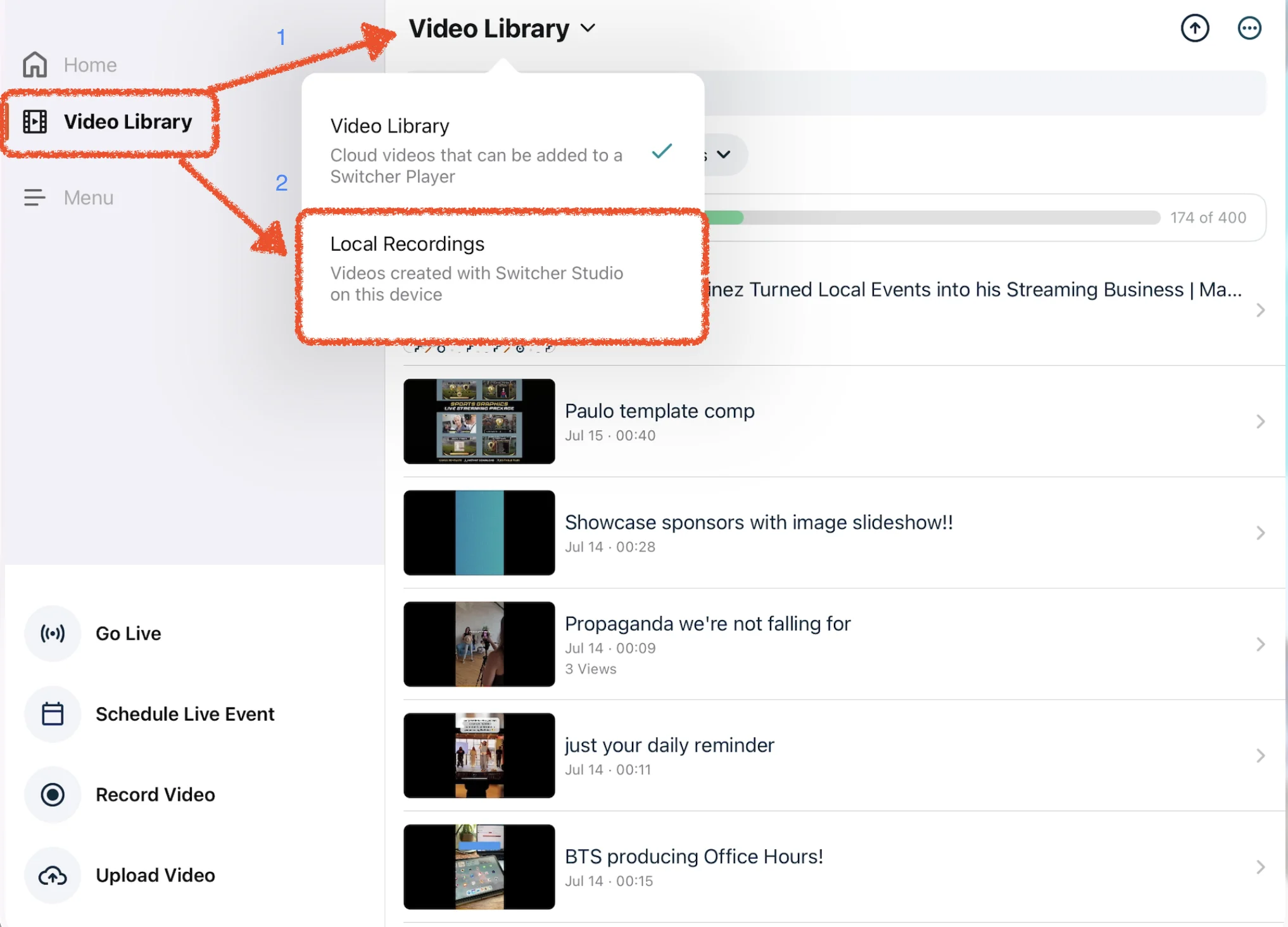
Pro Tip: Once you've located the Local Recordings section, you can create short-form clips for social media or export to your device's Files App or Camera Roll.
Can we monetize streams?
Yes! Many sports programs use one-time passes or subscriptions for tournaments, events or premium access.
How do I remove the Switcher watermark from my stream?
Easy! Any purchase of a paid subscription will have you streaming sans-watermark. All future recordings and live streams will feature only the branding you decide to show on screen.
Activate your subscription here!